
Best Moving Calculators to Plan Your Move Like a Pro

Moving can feel like you’re budgeting blindfolded. You think you’ve covered everything, like the truck, fuel, and packing supplies, and then another hidden cost pops up.
That’s where moving calculators come in. The right one turns the guessing game into something predictable: an estimate grounded in real data, not wishful thinking.
Over the past few weeks, I tested a range of popular moving calculators, from all-in-one cost estimators like moveBuddha to niche tools that calculate boxes, truck sizes, or even storage fees. Some were impressively accurate, while others were just marketing funnels disguised as calculators.
This guide breaks down the best moving calculators to plan your move like a pro. I’m talking about the ones that give you usable numbers, help you compare your options, and actually make planning easier.
Whether you’re budgeting for a cross-country relocation or a short local hop, these tools can save you time, money, and a few headaches.
My Moving Calculator Comparison Chart
Before diving into detailed reviews, here’s a quick overview of the calculators that stood out during testing.
Each one serves a slightly different purpose, from full-cost estimates to packing supply tools, but all deliver reliable, transparent results.
Use this table to find the right tool for your move at a glance.
| Calculator | Type | Best for | Requires Personal Info? | Why It’s Worth Using |
| moveBuddha Moving Cost Calculator | All-in-one moving cost | Accurate estimates without spam | No | Uses verified data from thousands of real moves to compare full-service, container, freight, and DIY options side by side |
| iMoving Cost Calculator | Cost estimator | Getting marketplace-style quotes | No | Aggregates rates from hundreds of licensed movers for instant side-by-side comparisons |
| U-Pack Moving Cost Calculator | Cost estimator | Long-distance, self-moves | Minimal | Transparent pricing with no hidden fuel fees or surprise add-ons |
| This Old House Calculator | Cost estimator | Homeowners planning big moves | Yes | Offers reliable cost ranges with expert moving tips and educational content |
| Moving.com Calculator | Cost estimator | Quick budgeting | Yes for a detailed quote | Generates national average estimates based on distance and packing level |
| U-Haul Supplies Calculator | Packing supplies | DIY moves and packing plans | No | Estimates boxes and packing materials by room, then builds a ready-to-order list |
| Home Depot Moving Calculator | Packing supplies | Organizing and shopping lists | No | Detailed room-by-room supply breakdown for efficient planning |
| Penske Truck Size Calculator | Truck size | Picking the right rental size | No | Matches truck sizes to home layouts, helping you avoid wasted space |
| Extra Space Storage Calculator | Storage cost | Downsizing or in-between moves | No | Estimates moving costs, truck size, and storage needs based on your home size |
| 1-800-PACK-RAT Space Calculator | Container & storage space | Estimating how much fits in a portable container | No | Helps you visualize and budget container space needs before booking |
| moveBuddha Car Shipping Calculator | Auto transport | Adding a car to your move | No | Compares quotes from top-rated carriers like Montway and Sherpa |
How Moving Calculators Work (and Why You Should Use One)
A good moving calculator is like a pre-move reality check. It uses variables like distance, home size, date, and service type to create a cost range you can budget around.
For example, if you’re moving a three-bedroom home from Austin to Denver, a calculator factors in mileage, weight, season, and whether you’re hiring professionals or driving a rental truck. The best calculators even compare methods side by side so you can see how much you’ll save (or spend) by going DIY versus full-service.
The key is transparency. Reliable calculators show you numbers up front, without demanding your email or phone number first. Those that gate results behind personal info usually pass your details to multiple movers (or who knows what other companies), which leads to spam calls and inconsistent quotes.
That’s why I prefer tools like moveBuddha, iMoving, or U-Pack: they give you an honest starting point before you ever speak to a sales rep.
Best Overall Moving Cost Calculators
If you want to know what your move will actually cost, these are the calculators that get closest to the real number.
I tested several of the most popular options and found that the following tools consistently delivered accurate, spam-free estimates with useful context on how pricing breaks down.
1. moveBuddha Moving Cost Calculator
Best for: Comprehensive, spam-free moving estimates
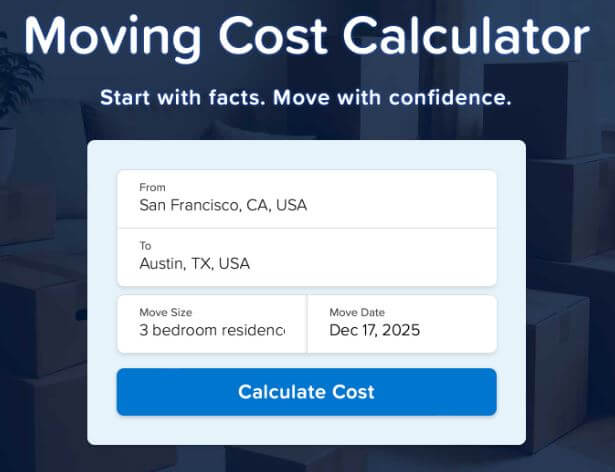
The moveBuddha Moving Cost Calculator is my top choice for one simple reason: it’s accurate without being invasive. You don’t need to share your name, email, or phone number to get an instant estimate.
You enter your starting and destination ZIP codes, move size, and date, and within seconds, you’ll see realistic costs for different moving methods: full-service movers, containers, freight, and rental trucks.
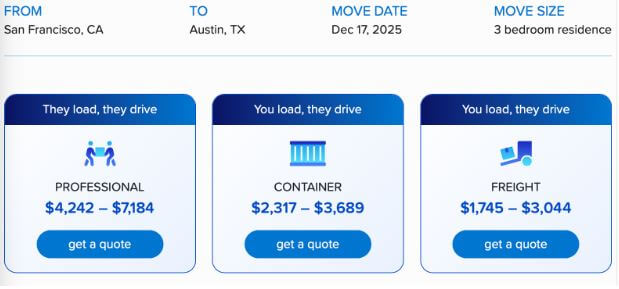
What sets moveBuddha apart is its data foundation. The tool pulls from thousands of verified moves and uses over 20 performance metrics to ensure its numbers reflect real market conditions.
Each moving company in its network is licensed, insured, and vetted through moveBuddha’s review standards.
You can compare how moving dates and home size affects price. That transparency makes it easier to adjust your plans: move mid-week off-season instead of on a weekend in-season, or opt for a hybrid container move instead of full-service.
Bonus feature: moveBuddha also offers a Car Shipping Calculator, which lets you compare auto transport quotes from leading carriers like Montway and Sherpa Auto Transport.

Pro tip: Use moveBuddha first to set a baseline. Then, when you check other calculators, you’ll know if they’re overshooting or underestimating.
2. iMoving Cost Calculator
Best for: Quick marketplace comparisons
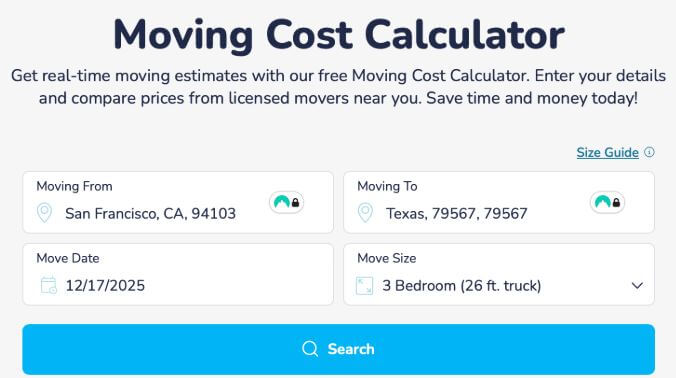
Simply enter your locations, home size (house or apartment) or storage size, and move date, and it generates multiple real-time quotes without demanding personal details.
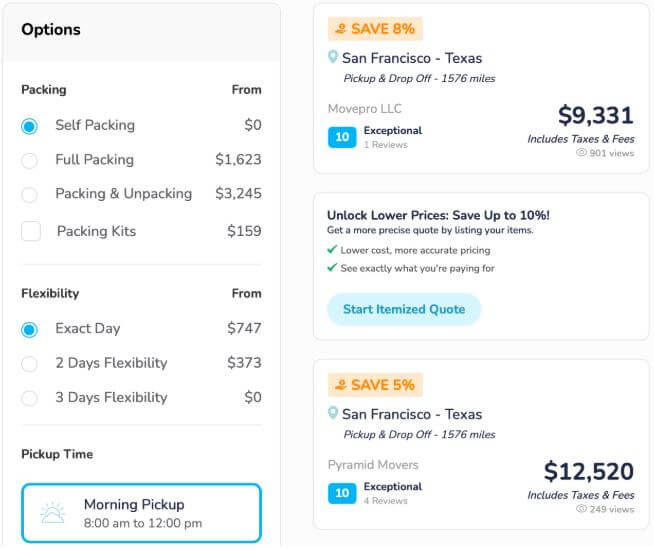
You can then tailor the results by using the filter or choosing the:
- Packing method (DIY, full packing, packing & unpacking, or packing kits)
- Flexibility (from you move date)
- Pickup time (morning or afternoon)
- Delivery (standard, expedite, or straight)
Because iMoving operates as a marketplace, you can view company ratings, licenses, and reviews before committing.
It’s ideal for people who want a wide cost range to compare movers quickly.
3. U-Pack Moving Cost Calculator
Best for: Long-distance, self-move estimates

U-Pack combines transparency with flexibility. Its cost calculator shows you how much you’ll pay for their container-based service, which is a hybrid between full-service and DIY moving. You load your belongings; they drive.
It’s easy to use this calculator: enter your locations, move size, and desired date, and you’ll get a quote.
It’s especially handy for people who want more control over their move but don’t want to drive a truck cross-country.
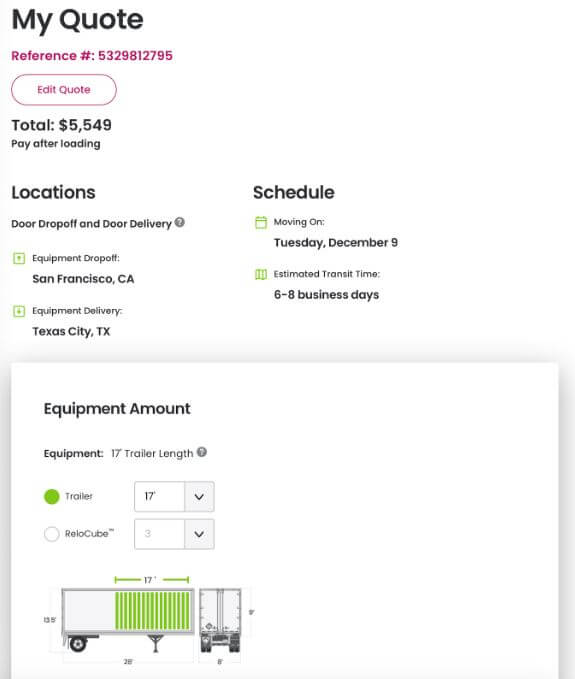
The quote includes equipment, delivery, transportation, and standard liability coverage. There are no hidden fuel surcharges or taxes, and you can choose between a trailer or ReloCube.
4. This Old House Moving Cost Calculator
Best for: Homeowners looking for trustworthy cost ranges

This Old House isn’t just about home renovation; their moving calculator gives solid cost estimates based on distance, weight, and service model. It’s ideal for homeowners relocating larger properties.

Start by entering your zip code and where you’re moving to, date, size, and, unfortunately, your contact info.
What I like most is the accompanying educational content: guides on local vs long-distance pricing, DIY vs professional costs, and budgeting strategies.
5. Moving.com Moving Cost Calculator
Best for: Quick ballpark estimates
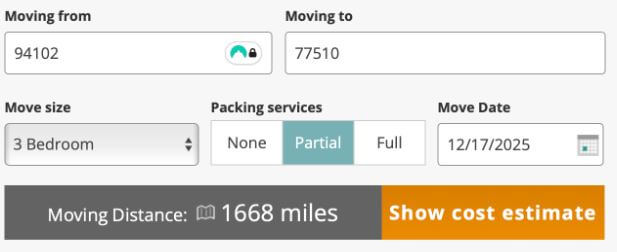
Moving.com’s calculator is straightforward: enter your origin, destination, home size, and packing level (none, partial, or full), and move date. It then provides average cost ranges based on national data.
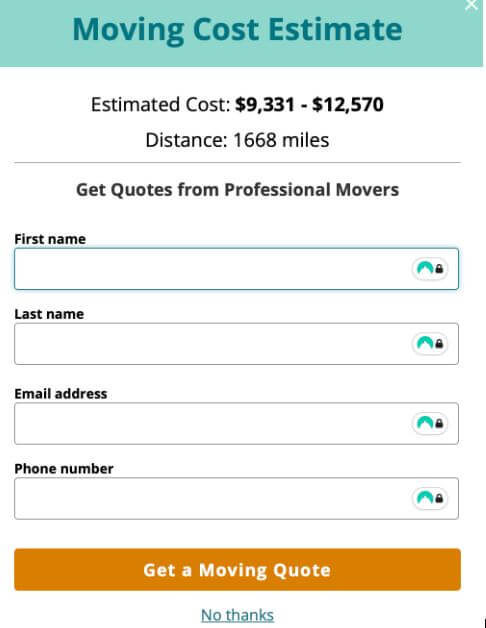
It’s handy for getting a rough idea early in the process, but detailed quotes require personal info.
Best Calculators for Specific Moving Needs
Not every calculator is created to handle everything. Some focus on moving cost, while others help you with estimates on logistics like truck size, packing supplies, or storage space.
These tools help you fine-tune the details of moving that often gets overlooked when you’re focused on the big budget picture.
6. U-Haul Moving Supplies Calculator
Best for: Estimating boxes and packing materials

U-Haul’s supply calculator is a favorite for DIY movers. You can select how many bedrooms you’re packing, note special spaces like garages or offices, and check boxes for items like TVs or mattresses.
The calculator then generates a personalized shopping list of boxes, tape, and cushioning materials, all ready to add to your cart or print out.
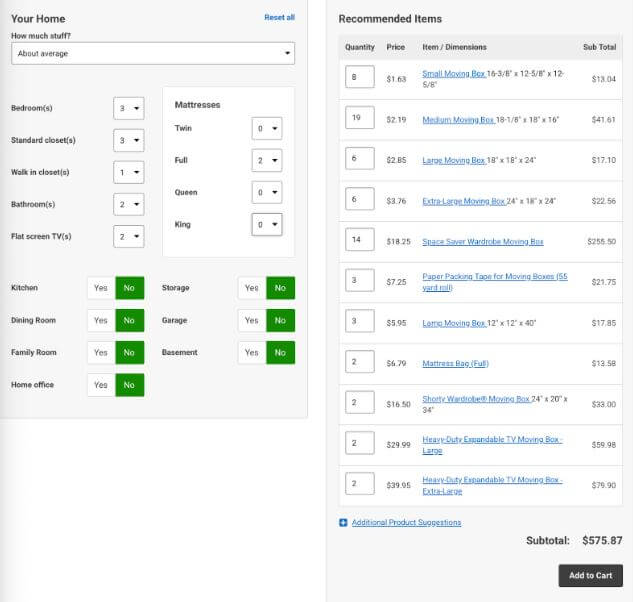
I like that U-Haul offers free shipping on large orders and a buy-back guarantee on unused boxes.
It’s simple, direct, and helps avoid those last-minute “we need three more boxes!” moments.
7. The Home Depot Moving Calculator
Best for: Detailed supply and packing plans
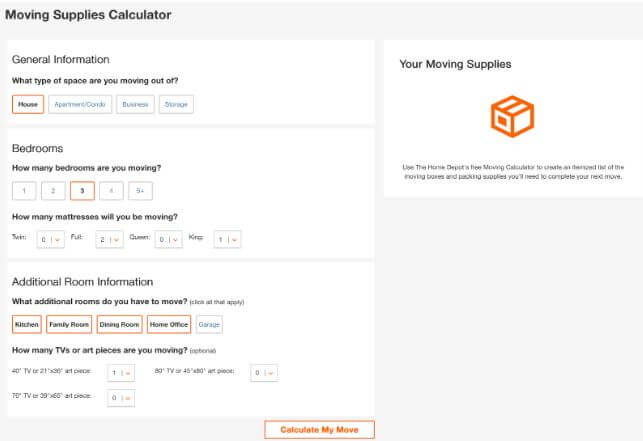
Home Depot’s moving calculator is more granular than most. Instead of asking only for home size, it prompts you to list rooms (bedroom, kitchen, office, garage), mattress types and quantities, and even whether you have large TVs or art pieces.

It then suggests quantities of boxes and protective materials based on your setup, letting you either print a list or add everything to your cart.
It’s perfect if you’re planning a move room by room and want a clearer breakdown of what to buy.
Pro tip: Even if you don’t order from Home Depot, use the list to compare prices at local stores.
8. Penske Truck Wizard
Best for: Choosing the right truck for your load
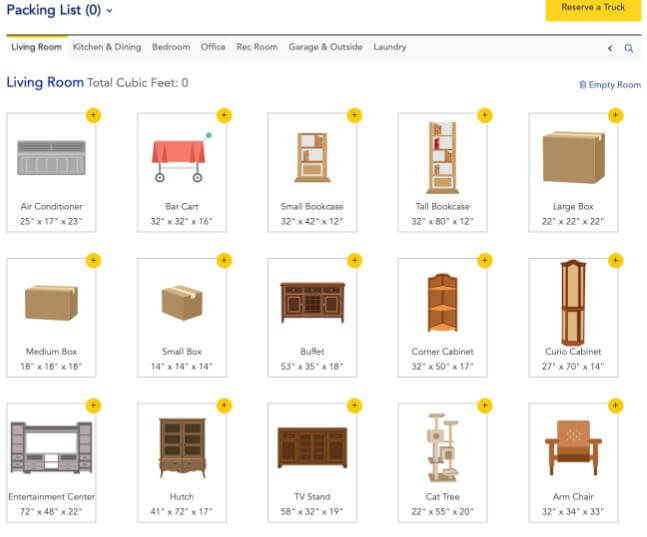
Picking the wrong truck size can derail a move. Penske’s calculator removes that guesswork. By clicking on the items you have per room, it recommends truck sizes, from 12-foot models for studios to 26-foot trucks for four-bedroom homes.

If you want to reserve a truck, you’ll need to enter your personal details.
9. Extra Space Storage Calculator
Best for: Downsizers and in-between movers
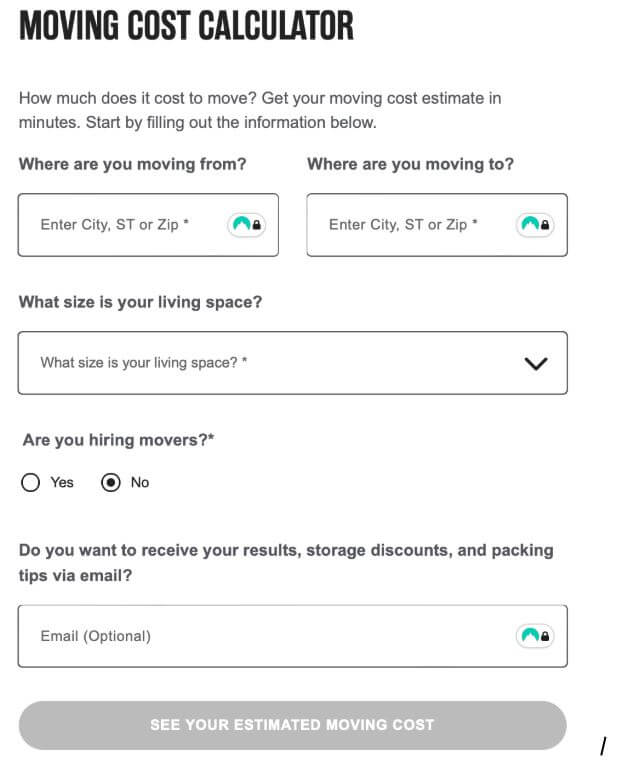
If your move includes temporary storage, Extra Space’s unit size calculator helps you estimate how much space you’ll need.
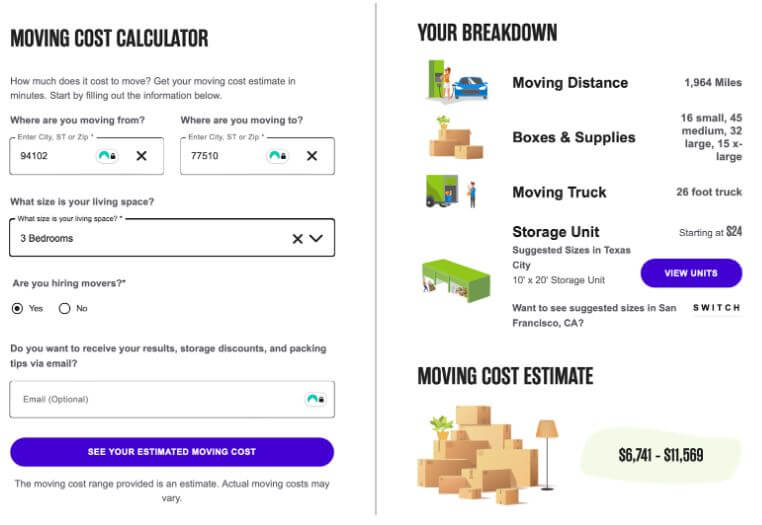
Choose from common categories (1-bedroom, 2-bedroom, etc.) and the tool shows the moving distance, boxes and supplies, moving truck size, storage unit size, and moving cost estimate.
10. 1-800-PACK-RAT Space Calculator
Best for: Estimating container or storage space

If you’re planning to use a moving container instead of a truck, 1-800-PACK-RAT’s Space Calculator is one of the easiest ways to visualize what will fit.
You enter the number of rooms or a rough inventory of your belongings, and it estimates the amount of space you’ll need, whether that’s one 8-foot container or multiple 16-foot units.

Niche Tools Worth Checking Out
These are helpful if you want a second opinion or a regional comparison, but for most users, the major calculators above will cover all your bases.
- Forbes Moving Space Estimator: Calculates how much square footage your belongings will occupy in a moving truck or container.
- FreightWaves Moving Calculator: Useful for commercial or freight-based relocations.
- North American Van Lines Calculator: Great for getting a quick professional mover quote.
- Piece of Cake Moving & Storage Calculator: Boutique option popular in New York City for local moves.
How to Choose the Right Moving Calculator
Start by asking what you’re trying to estimate.
- Overall move cost? Go with moveBuddha, iMoving, or U-Pack.
- Packing supplies? Choose U-Haul or Home Depot.
- Truck size? Use Penske or U-Haul.
- Storage or vehicles? Consider Extra Space or moveBuddha’s car calculator.
If you’re comparing quotes, check whether the tool uses national averages or verified data. The more localized and current the dataset, the more accurate the estimate.
Also consider how the calculator handles privacy. A tool that gives results instantly is usually more trustworthy than one that gates results behind a form where you have to share your details.
And remember: even the best calculators are starting points. Actual quotes can vary based on demand, route changes, or the day you book.
What to Avoid: The “Free Quote” Trap
Not all calculators are created equal. Some, like Relocation.com, ask for your name, phone number, and email before showing any results. That’s a red flag.
These “free quote” sites typically share your info with several partner movers. Within hours (or minutes in my case), you’ll start receiving calls and emails, often from companies you didn’t choose. It’s not dangerous, but it’s disruptive and can muddy your decision process.
A good calculator gives you a clear range upfront, then lets you decide when to contact movers.
Look for tools that say “No personal info required” or “Instant estimate.” If you don’t see that, it’s safer to skip.
Pro Tips for More Accurate Estimates
Even the best moving calculators can only go so far if the information you enter isn’t realistic. Small details, like forgetting that storage run or underestimating how much furniture you actually own, can throw your budget off fast.
These quick tips will help you get the most accurate numbers possible and make sure your final quote lines up with what you see online.
- Be realistic about your inventory. Under or over-estimating your move size can swing costs by hundreds of dollars.
- Account for time and season. Moves during peak summer months cost 20–30% more than off-season relocations.
- Check multiple calculators. Cross-checking two or three tools gives you a better average.
- Factor in extras. Parking permits, tolls, temporary storage, and insurance aren’t always in the calculator.
- Move mid-week if you can. Many calculators show lower weekday rates, an easy way to save money.
FAQs About Moving Cost Calculators
How accurate are moving calculators?
They’re typically accurate within 10–15% when you enter full details. MoveBuddha, iMoving, and U-Pack tend to be the most precise since they use real move data instead of national averages.
Are moving calculators free?
Yes, all the tools listed here are free to use. Some may offer to connect you with movers afterward, but you don’t need to pay to access estimates.
Do moving calculators include packing supplies?
Most cost calculators focus on transportation. For supplies, use U-Haul’s or Home Depot’s calculators.
What’s the best moving calculator for long-distance moves?
MoveBuddha and U-Pack are the most reliable for cross-country moves. Both compare different service types so you can choose between container, freight, or full-service options.
Why do some moving calculators need personal information?
Those calculators usually act as lead generators, sending your info to multiple movers for follow-up quotes. Use them cautiously if you prefer privacy.
Plan Your Move Like a Pro
A moving calculator won’t pack your boxes, but it can save you from costly surprises. The best ones translate your move into numbers you can act on, showing what’s realistic before you commit to anything.
After comparing them all, moveBuddha’s calculator stands out for its accuracy, transparency, and simplicity. It gives you instant estimates for multiple moving methods, no email required, and even helps with car shipping.
Whether you’re estimating costs, picking a truck size, or planning how many boxes to buy, these calculators can turn a stressful, uncertain process into a predictable plan.
Start with one or two, then refine your move from there. When you know the real costs, every other decision gets easier.